There are a lot of ways to keep track of your bookmarks on the web these days. Most of them store your links online as a long searchable list. It great to be able to access them from different computers and to share them with friends and coworkers, or to connect and collaborate with people all over the world. But its still just a big list. Pearl trees has developed something different.
A word of caution:
Like any social media Pearl Trees is a great way to connect with people. If you plan to use it to leave visual bread crumbs for students be careful to monitor your connections as you cannot control which sites other users set as links.
Tuesday, February 22, 2011

Sunday, February 13, 2011
The Scrollwheel
We have patience for everyone who is learning to become a more effective presenter and for those who are learning at new things because they love to learn. But from time to time we all experience this.
Saturday, February 5, 2011
Not Sure Where to Present a Big Idea? Try the Hallway, All of it.
 January 27 was International Holocaust Memorial Day. Rather than stand up in class an talk, I wanted to do something different with my students. I wanted them to get an idea of the magnitude of 6 million people. Looking online I found the Yad Vasham Shoah database but quickly realized that even presenting it on the IWB in our classroom wouldn't reveal the enormity of this partial list of victims. The 166 page list of adults and children ranging from 1 to 78 years old contains over 2000 names. My classes and I figured it mathematically to be .03% of the total. What caught there attention the most was that the list as we presented it stretched the entire length of our wing of the building. As my students walked quietly down the hall I asked them to look for the youngest and the oldest to compare the number of adults to children and to determine why we have so much detailed information. When we returned to class we were able to have a discussion of the magnitude of the Holocaust that was appropriate to the meaning of the day.
Monday, January 31, 2011
Using Video to Create Autonomous Presentations
This past week I have been learning to edit video. I have used Photo Story 3 for about a year to create Ken Burns style video clips for class based out of the thousands of historic images that I have collected over the years. My students respond pretty well to them, and they do equally well with quality Youtube videos. Last week while studying the Holocaust I found lots of good videos but the big problem was some of the imagery was too explicit for 8th grade students. I also have a good number of DVD's and other long films but keying them up to just the right information and skipping through them takes valuable time.

Finally I found a great solution. Moyea's FLV editor Lite is a free program that allows you to edit flv files quickly and easily. It contains seperate lines for video and audio that can be trimmed and cut so that either or both can be removed or replaced. Those shocking images from a documentary of Youtube video can be pulled out while the commentary remains in place.
 If you have video that is in any other format then Quick Media Converter is my favorite App. Its also free and simple to use. It can change nearly any video file into anything else. DVD into FLV no problem.
If your just looking to download and play Youtube videos Realplayer has a video download function that allows you to download video from almost any website. It has a trim function as well though it is not as advanced.
Here's an example. All Quite on the Western Front is available on Google video. But its a two hour film and I only need two sections of it. I wanted my students to know what life was like in the trenches of WWI, so I sat them on the floor in between two rows of desks in the dark. First I had them read from Over the Top by Arthur Guy Empey 1917.
The read Chapter IV from the book, which is only about five pages long, and then we watched the trench scene from All Quiet that is presented below. Afterward, they began writing letters home as if they were the soldiers in the trenches.
Untitled from Historyman8 on Vimeo.
I know they get more out of this than if I lecture or if they just read from a book. In order to share their letters they post them on their blogs as I mentioned in as previous post.

Finally I found a great solution. Moyea's FLV editor Lite is a free program that allows you to edit flv files quickly and easily. It contains seperate lines for video and audio that can be trimmed and cut so that either or both can be removed or replaced. Those shocking images from a documentary of Youtube video can be pulled out while the commentary remains in place.
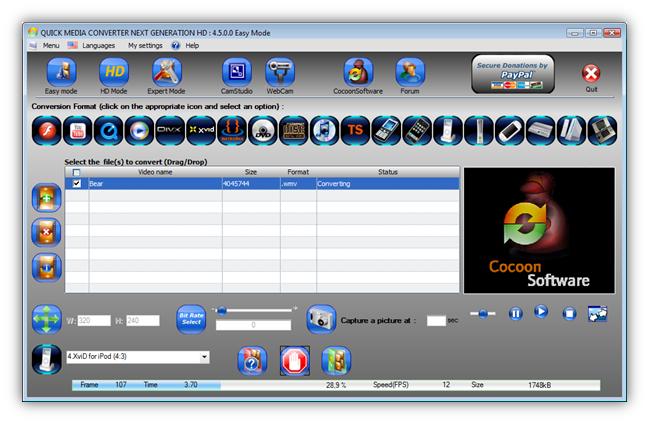
If your just looking to download and play Youtube videos Realplayer has a video download function that allows you to download video from almost any website. It has a trim function as well though it is not as advanced.
Here's an example. All Quite on the Western Front is available on Google video. But its a two hour film and I only need two sections of it. I wanted my students to know what life was like in the trenches of WWI, so I sat them on the floor in between two rows of desks in the dark. First I had them read from Over the Top by Arthur Guy Empey 1917.
The read Chapter IV from the book, which is only about five pages long, and then we watched the trench scene from All Quiet that is presented below. Afterward, they began writing letters home as if they were the soldiers in the trenches.
Untitled from Historyman8 on Vimeo.
I know they get more out of this than if I lecture or if they just read from a book. In order to share their letters they post them on their blogs as I mentioned in as previous post.
Tuesday, January 18, 2011
Visualization
21st Century Presentation Literacy was not established as a regular posting forum, but I find myself feeling more responsible to the blogosphere to become a regular contributer. I rarely make New Year's resolutions but this year I have decided to try to make more regular editions to the blog and to expand its scope to include more differentiated methods of presenting information in the educational environment. From stand up presentations to website design everything educators do as learning leaders needs to be modeled and to be constructed with solid presentation design. The Periodic Table of Visualization below should help myself , an I hope others, craft presentations of any kind.
Special thanks to the people at Visual-Literacy.org for setting this up and for everything they do for "Communication, Engineering and Business". Remember even if it doesn't say education we still need to find ways to enable our learners to develop these same skills.
Special thanks to the people at Visual-Literacy.org for setting this up and for everything they do for "Communication, Engineering and Business". Remember even if it doesn't say education we still need to find ways to enable our learners to develop these same skills.
Subscribe to:
Posts (Atom)